

Read fleet records, telemetry, and available forecasts as JSON. Ingestion is a separate authenticated service.
Read telemetry
GET /api/telemetry returns an array of public records. Set resource to devices or telemetry, and provide an explicit comma-separated select list. A successful request with no matches returns [].
List devices:
/api/telemetry?resource=devices&select=device_id,launcher_name,status,launched_at&order=device_id.ascRead one balloon’s latest 100 packets:
/api/telemetry?resource=telemetry&select=id,device_id,time,lat,lon,altitude_m,pressure,battery_voltage&device_id=eq.stratolink-3&order=time.desc,id.desc&limit=100Use the same origin as the site. You do not need a database key to call these public read routes. They accept GET only, return JSON, and use Cache-Control: no-store.
| Parameter | Accepted values |
|---|---|
| resource | devices or telemetry |
| select | Explicit fields from the chosen resource. Wildcards and nested selections are not supported. |
| device_id | eq.my-balloon or in.(balloon-a,balloon-b) |
| time | gte.ISO_TIMESTAMP and/or lte.ISO_TIMESTAMP for telemetry. Repeat the parameter to set both bounds. |
| lat / lon | not.is.null for telemetry |
| order | device_id.asc for devices; time.asc,id.asc or descending order for telemetry. |
| limit | Non-negative integer, capped at 1,000. Default 1,000. |
| offset | Non-negative row offset. |
Other query parameters return 400. There is no count envelope or cursor token; paginate using a stable order and offset. Fields supported by one resource are not automatically valid on the other.
Time ranges and pagination
This browser example reads a bounded UTC interval. Replace the ID and times with the flight you need. The upper bound limits the query to a fixed window while pages load.
const params = new URLSearchParams({
  resource: 'telemetry',
  select: 'id,device_id,time,lat,lon,pressure',
  device_id: 'eq.stratolink-3',
  order: 'time.asc,id.asc',
  limit: '1000'
});
params.append('time', 'gte.2026-05-17T00:00:00Z');
params.append('time', 'lte.2026-05-19T00:00:00Z');

const rows = [];
for (let offset = 0; ; offset += 1000) {
  params.set('offset', String(offset));
  const response = await fetch('/api/telemetry?' + params);
  if (!response.ok) throw new Error('Telemetry: ' + response.status);
  const page = await response.json();
  if (!Array.isArray(page)) throw new Error('Expected an array');
  rows.push(...page);
  if (page.length < 1000) break;
}
Offset pagination is not a database snapshot. Backfilled or deleted rows can move between pages; deduplicate by id if your analysis needs that protection. For a quick map query, add lat=not.is.null and lon=not.is.null. Omitting those filters preserves packets with useful sensors but no position.
Device fields
| Field | Meaning |
|---|---|
| device_id | Stable dashboard device identifier. It is not necessarily the DevEUI. |
| launcher_name | Display name associated with the launch. |
| status | Stored status, such as flying, landed, or missing. The dashboard’s recent-reception active filter is a separate calculation. |
| launched_at | Recorded launch timestamp, when available. |
| planned_launch_date | Optional approximate launch date, as YYYY-MM-DD. This is separate from the actual launch timestamp. |
| launch_lat / launch_lon | Public launch coordinates in degrees, or null. Privacy rules can coarsen them. |
| location_approximate | Added by the public response when coordinates are treated approximately. |
The read route does not expose account credentials, a registration write operation, or proof of device ownership.
Telemetry fields
| Fields | Decoded units and meaning |
|---|---|
id, device_id | Record ID and dashboard device identifier. |
time | TTN reception timestamp. Not an independent timestamp for each sensor. |
lat, lon | GPS coordinates in degrees, nullable. |
altitude_m | Receiver height in meters. Distinct from the pressure altitude computed by the dashboard. |
gps_speed, gps_heading | Ground speed in m/s and heading in degrees clockwise from north. |
gps_satellites | Satellites used in the fix. |
temperature, pressure | Payload temperature in °C and pressure in hPa. |
battery_voltage, solar_voltage | Storage VSTOR and solar-input voltage in volts. |
mems_accel_x, mems_accel_y, mems_accel_z | Board-axis acceleration in m/s², including gravity. |
velocity_x, velocity_y | Derived horizontal eastward and northward velocity in m/s, when available. |
uv_index, ambient_lux | Integer UV-index estimate and ambient illumination in lux. |
acoustic_event | Short-window sound-threshold flag. Not a sound classification. |
rssi, snr | Gateway received signal strength in dBm and signal-to-noise ratio in dB. |
lora_sf, lora_bw, frequency_hz | Spreading factor, bandwidth in Hz, and uplink frequency in Hz from network metadata. |
gateways | Array of receiver records, or null. Public fields: gateway_id, lat, lon, alt, rssi, snr; some include location_approximate. |
firmware_version, uptime_s, tx_count | Optional compatibility fields for firmware version, uptime in seconds, and transmit count. Do not assume every packet format supplies them. |
hdop, power_mode, sleep_ms | Optional dilution-of-precision, power-mode, and sleep-duration fields. Sleep is in milliseconds. |
telemetry_version | Binary format: 1 for 35-byte packets; 2 or 3 for 40-byte packets. |
power_tier | Load-shedding tier: 0 (full) through 4 (critical). |
reset_cause | Reset code: 0 unknown, 1 watchdog, 2 software, 3 low-power or option reset, 4 cold power-on, 5 warm brownout, 6 reset pin. |
boot_count | One-byte boot counter. A change can identify a restart; it is not elapsed time. |
gps_fix_age_min | Minutes since a fresh accepted GPS fix. Null when none is available this boot. |
server_proof_count_mod8 | Authenticated server/session confirmations modulo 8, supplied by v3 packets. |
server_qualified_miss_streak | Consecutive qualified confirmation misses, encoded from 0 to 3. |
server_recovery_parity | Completed same-region session recoveries modulo 2. |
command_ack_seq | Last durably applied fPort-10 command sequence, or null. |
relay_enabled | Whether balloon-to-balloon forwarding is enabled. |
relay_fwd_delta, ctt_tags_delta | Packed activity counters: relay forwards from 0 to 7, wildlife tags from 0 to 15. They are not lifetime totals. |
location_approximate | True when coordinates were deliberately coarsened. May be absent on an ordinary telemetry record. |
Request these fields by name in select, except location_approximate, which the response adds when applicable. Preserve null; replacing missing GPS, a saturated sensor, or an unavailable channel with zero changes the meaning of the data.
The public API applies location privacy before returning records. Approximate positions can also suppress heading and derived velocity. Receiver coordinates and identifiers receive the same privacy treatment where applicable. The API does not apply every outlier filter used by the rendered flight track.
For acquisition and encoding, see Packets and data flow. For interpreting the charts, see the dashboard guide.
Binary packets and auxiliary channels
Primary telemetry is fPort 1: 35 bytes historically, or 40 bytes for development v2/v3. Multibyte integers are big-endian. The decoder download handles the version markers and unavailable-value sentinels.
fPort 11 wildlife records and fPort 12 balloon-to-balloon records are stored separately. Those auxiliary tables are not part of this public read API. Diagnostic fields are nullable on packet versions that do not supply them. Decoding a B2B record is not the same as authenticating it with the fleet key.
Forecasts
GET /api/forecast?device=stratolink-3 returns the available forecast for one device. It does not return a new measured location. Add &view=path to return only generated_at and nominal_path when drawing a fleet map.
Add &view=history to return only generated_at and the reconstructed track for a balloon that is no longer flying. Successful responses may be served from a shared cache for up to five minutes (Cache-Control: public, s-maxage=300, stale-while-revalidate=3600) and carry an ETag derived from generated_at; a request with a matching If-None-Match header receives 304 Not Modified. Pending, unknown-device and error responses are not cached.
| Field | Shape and meaning |
|---|---|
| generated_at | Forecast generation timestamp. |
| forecast_origin.time_utc | Time of the modeled starting point. |
| forecast_horizon_h | Time span in hours after the origin. |
| nominal_path | Array of [longitude, latitude] coordinate pairs. |
| ensemble | Array of paths representing model runs. |
| ellipses | Time slices containing e50.polygon and e90.polygon coordinate arrays. These are model uncertainty regions. |
| predicted_hindcast.path | Modeled path from an earlier fix toward the forecast origin. |
| observed.reconstructed_path | Reconstructed path through earlier GPS gaps. Despite the field name, it includes modeled geometry. |
| observed.reconstructed_track | Timed reconstruction points with lon, lat, and time_utc. |
| stale_gps.coverage_limited | When true, the model ran out of weather coverage before reaching the intended origin. |
| divergence | Optional lonlat, spread_km, and threshold_km describing where paths diverged. |
Coordinate order is longitude first. Longitudes can extend past ±180° to keep paths continuous across the date line. Empty arrays and absent optional fields are valid. Location privacy also applies to forecast geometry.
Check the HTTP status before interpreting JSON. A 202 response means no stored forecast is available; it is not a complete forecast object. A 404 means the device is unknown or unconnected. A 503 means the forecast service could not complete the read. An unavailable forecast leaves the recorded telemetry intact.
Errors
| Status | Meaning |
|---|---|
| 400 | Unsupported telemetry fields or filters, or an invalid forecast device ID. |
| 404 | The forecast device is unknown or has no connected radio identity. |
| 405 | The public endpoint is read-only. Use GET. |
| 502 | The telemetry data could not be read. |
| 503 | The stored forecast could not be read. |
| 202 | No stored forecast is available. The response contains status: "pending" and the device ID. |
Error responses contain a message string. The forecast endpoint reads the stored result; it does not start a new calculation. A 202 response is a pending result, not an error or a complete forecast. Do not treat an error object as an empty telemetry array.
TTN webhooks
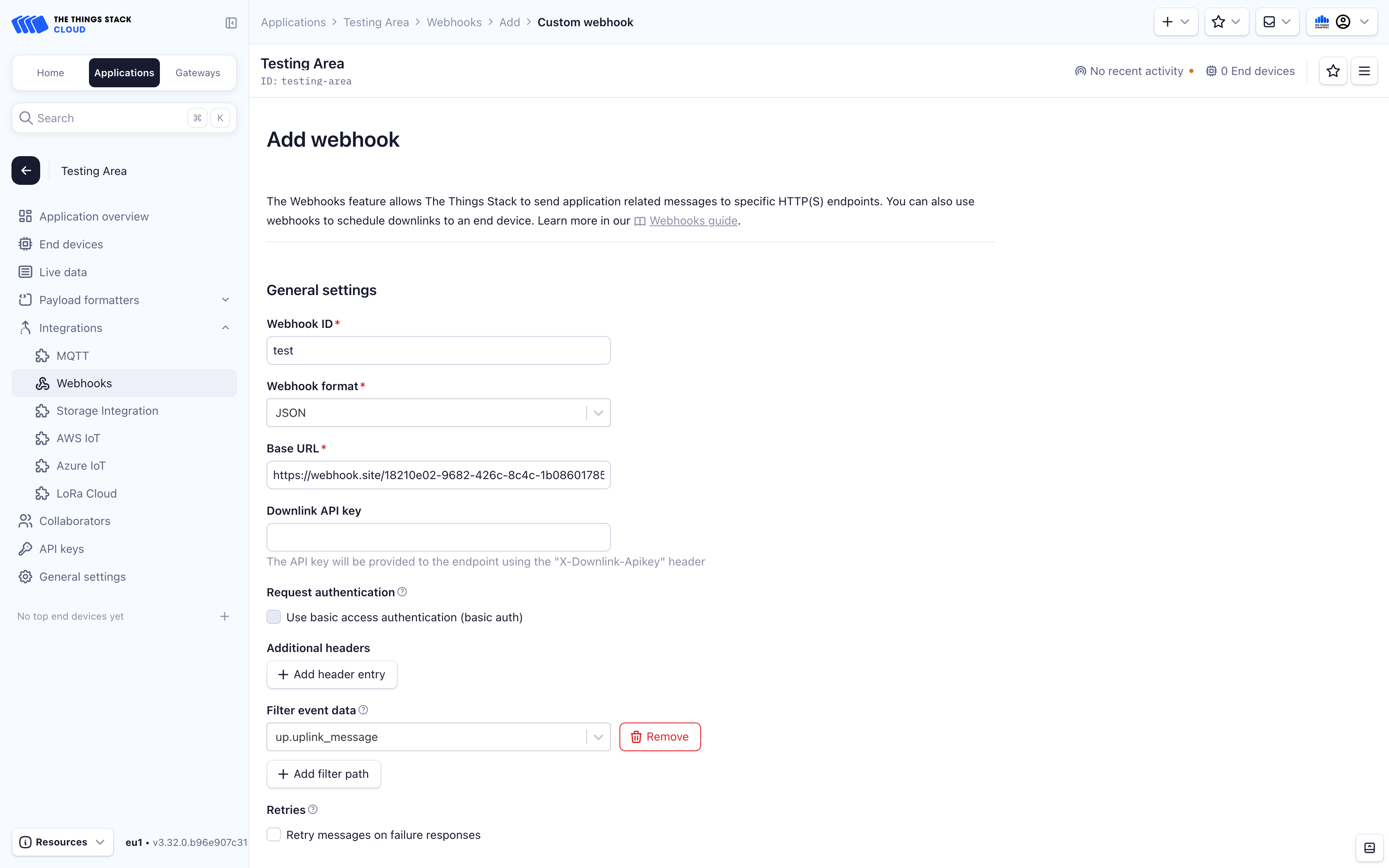
Complete Connect TTN in the dashboard first. It provides a webhook URL and a separate Authorization header for the verified radio identity.
- In the same TTN application and cluster, open Integrations → Webhooks and add a custom webhook.
- Choose JSON. Paste the complete Webhook URL from the dashboard into Base URL.
- Enable Uplink message and leave its path empty. The copied base URL already ends in
/api/ttn-webhook. Leave the other event types disabled. - Leave Filter event data empty so the complete device identity, raw bytes, and reception metadata are forwarded.
- Add a header named
Authorization. Paste the dashboard’s complete value, includingBearer, into its value field. - Save and send a real payload uplink. Check successful delivery in TTN and Last received under Your balloons.
Copy the webhook credential before closing the result. Stratolink stores its hash, so the credential cannot be shown again. If it is lost or exposed, select Reconnect, verify the device again, then replace the header in TTN. Replacing it immediately invalidates the old credential.
The webhook credential is separate from the TTN API key used for verification, the radio’s AppKey, and your GitHub session. Never substitute one for another.
Packet identity and retries
The receiver matches the authenticated connection, application ID, TTN device ID, and DevEUI to the registered balloon. Regional identities are linked explicitly. A suffix such as -eu is not proof of ownership. TTN webhooks belong to applications, so they can also deliver packets from other devices. Those events are acknowledged without being assigned to your balloon.
Keep the complete TTN payload. Primary telemetry uses fPort 1, wildlife records use fPort 11, and balloon-to-balloon records use fPort 12. Repeat deliveries are acknowledged without inserting the same record again. A received packet can be valid without GPS coordinates.
Response codes
| Code | Meaning |
|---|---|
| 200 | Accepted packet or acknowledged duplicate. |
| 202 | Authenticated event for another device in the same application. No record stored. |
| 400 | Invalid identity, event type, port, or payload. |
| 401 | Missing, revoked, or mismatched connection credentials. |
| 405 | Use POST for webhook delivery. |
| 413 | Request exceeds the 256 KiB body limit. |
| 503 | Ingestion is temporarily unavailable. TTN can retry the same delivery. |
Run your own backend
The website and its Node API handlers live in web. Supabase stores accounts, device identities, and telemetry. The forecast worker writes to private Vercel Blob storage.
cd web
cp .env.example .env.local
ONNXRUNTIME_NODE_INSTALL=skip npm ci
npm run dev
Use Node 22. Set your Supabase URL, public authentication key, server-only database key, Mapbox token, and site origin in .env.local. Configure GitHub sign-in with a redirect back to your site’s /dashboard. Keep server credentials out of public environment variables.
Apply the database schema and migrations for the same source revision. The historical schema.sql alone is insufficient. Follow the migration instructions in the repository before connecting devices.
For Vercel, use web as the project root and dist as the build output. The included configuration serves the static pages and Node APIs. Configure the private forecast store and scheduled worker if you need projected paths.
Run npm run verify before deploying. npm run test:backend also checks the database contracts in a disposable local PostgreSQL container; it requires Docker.